WhatsApp AI Chatbot for UK Businesses — Campbell Consultancy
Services — WhatsApp AI Chatbot

WhatsApp is the most powerful operational tool your business isn't using properly.

Your team already runs on WhatsApp. The gap is that every message still requires a human to act on it — opening a system, entering data, sending a reply. We close that gap. One message triggers the whole operation: proposals, invoices, HR requests, staff onboarding, job updates. Automated. Accurate. Running 24/7.

< 2 min
From WhatsApp message to live proposal URL in the client's inbox.
£25/mo
Typical running cost for a fully operational WhatsApp AI agent after build.
0
Manual touchpoints between sending the message and the system acting on it.
24/7
Proposals, HR requests, onboarding and invoicing handled any time, from any phone.
The problem

Your team runs on WhatsApp. Your systems don't.

Every message needs a human in the middle

A staff member requests holiday. A client asks for a quote. An engineer finishes a job. Each one arrives on WhatsApp — and each one requires someone to open a system, enter data, and reply manually. That bottleneck is invisible until you add it up.

Your HR platform never reflects what's on WhatsApp

Holiday requests are in a chat thread. Sick days are verbal. New starter details are chased by a manager who already has too much on. The HR system is always three days behind reality.

Proposals and invoices wait for someone to get to a desk

The buyer is warm when they ask for a quote. Every hour between that conversation and the proposal landing in their inbox is an hour for them to call someone else. Sending a quote shouldn't require a laptop.

WhatsApp is already your operating system — you just haven't automated it

The message channel is not the problem. The problem is that nothing is connected to it. WhatsApp sits in isolation while your HR platform, CRM, and accounting software sit in their own silos, all waiting for a human to move data between them.

Use cases

One channel. Every operational workflow.

Each use case below is a real build — not a concept. The same WhatsApp number, the same automation layer, different workflows triggered by different message types.

Field services · Sales

Proposal generation

Send job details by message. Get a live branded proposal deployed to a URL and emailed to the client — in under two minutes, from any phone.

CC Sales Agent
Quote for a restaurant in Shoreditch — full extraction system, 3 canopies, monthly maintenance
Got it. Generating proposal now — confirming: 3 canopies, monthly contract. Correct?
Yes
Proposal live: proposals.cc.co/abc123 — client email sent.
01AI parses message
02Proposal generated
03Deployed live to URL
04Client emailed · CRM updated · Xero record created
Hospitality · HR

Leave & shift requests

Staff message a dedicated number to request holiday or report a sick day. The system checks entitlement, logs the request, and notifies the manager — without the manager being the bottleneck.

CC Staff Hub
Can I book Friday 4 July off?
Hi Jamie — checking your balance now.
You have 6 days remaining. Request raised for manager approval.
Brilliant, thanks
01Sender ID checked · intent read
02Entitlement pulled from HR platform
03Request raised · timestamped · logged
04Staff confirmed · manager notified for approval
Any sector · HR

New starter onboarding

New starters receive a WhatsApp message before their first day. They submit their details by reply. HR record, contract, and payroll are all set up automatically — before they walk through the door.

CC Onboarding
Welcome! Send your NI number, DOB and bank details to get set up.
NI: AB123456C · DOB: 12/03/98 · Acc: 12345678
Please photograph your right-to-work doc and send it here.
All done — contract sent to your email.
01Details collected via WhatsApp
02HR record created — BreatheHR · HiBob · Factorial
03Contract generated by role · sent for e-signature
04Xero payroll set up · RTW filed · manager notified
Field services · Finance

Invoice creation

An engineer messages job completion details. An invoice is created in Xero within thirty seconds. No laptop. No re-keying. No chasing the office to raise it.

CC Finance Agent
Job done at the restaurant on Baker Street — full clean, 4 hours, £420
Confirming: Baker Street site, full clean, 4hrs, £420. Raise invoice?
Yes
Invoice raised in Xero — INV-0294. Ready to send.
01Job details parsed from message
02Client record matched in Xero
03Invoice created · line items populated
04Confirmation sent back via WhatsApp
Any sector · Customer comms

Customer FAQs & inbound triage

Meta's native Business Agent handles inbound customer queries automatically — hours, pricing, bookings, availability. The right starting point before a full API build. Free to activate inside Meta Business Suite.

Your Business
What time do you open on Saturdays?
We're open Saturday 9am–5pm. Can I help with anything else?
Do you do large group bookings?
Yes — groups of 10+ should book via our website or I can pass you to the team.
METABusiness Agent — native to Meta Business Suite
01Inbound message received on WhatsApp Business
02Agent reads intent · responds from your FAQ
03Complex queries escalated to team
Field services · Ops

Job status & site updates

Engineers send voice notes or messages from site. The system transcribes, logs the update, notifies the client, and updates the job record in the CRM — all without anyone in the office.

CC Ops Agent
🎤 Voice note — job complete at Canary Wharf, minor fault flagged on canopy 2, logged on site sheet
Transcribed and logged. Client notified. Canopy 2 fault flagged for follow-up — Monday.com updated.
01Voice note transcribed automatically
02Job record updated in CRM
03Client notified automatically
04Follow-up task created for flagged items

These are six of the most common builds. Every business has its own highest-value workflow — the discovery call is where we find yours.

How it works — proposal build

One message. Eight steps. Everything handled.

The pipeline runs entirely in the background via Make.com, GitHub and Cloudflare. Your team just sends a WhatsApp message.

01

WhatsApp message sent

A team member sends a message with the job details — client name, service, scope and price. Plain English. No forms, no app, no login. See what WhatsApp automation actually makes possible →

02

AI parses the details

The AI reads the message and extracts the structured data — client, line items, values, dates. It confirms back to you via WhatsApp before proceeding.

03

Proposal or quote generated

A fully branded proposal or quote is built from your template — populated with the correct client details, pricing and scope. No copy-pasting, no errors.

04

Deployed live via GitHub and Cloudflare

The proposal is pushed to GitHub, auto-deployed to Cloudflare Pages and live at a permanent URL within seconds. Not a PDF attachment — a real, accessible link.

05

Link sent back on WhatsApp

The bot sends you the live URL immediately. "Proposal live at [url] — awaiting client approval." Share it yourself or let the system send it directly.

06

Branded client email generated and sent

A professional email is generated and sent to the client with the live proposal link, your branding and a clear call to action. No manual drafting.

07

Monday.com deal updated automatically

The deal record is created or updated in Monday.com — stage, value, proposal link and client details all populated. Your pipeline stays accurate without anyone touching it.

08

Xero contact and invoice created

On approval, a new client contact is created in Xero and the invoice is generated automatically. Zero re-keying. Zero missed details. Ready to send or approve.

The trigger — job details in, live proposal URL out
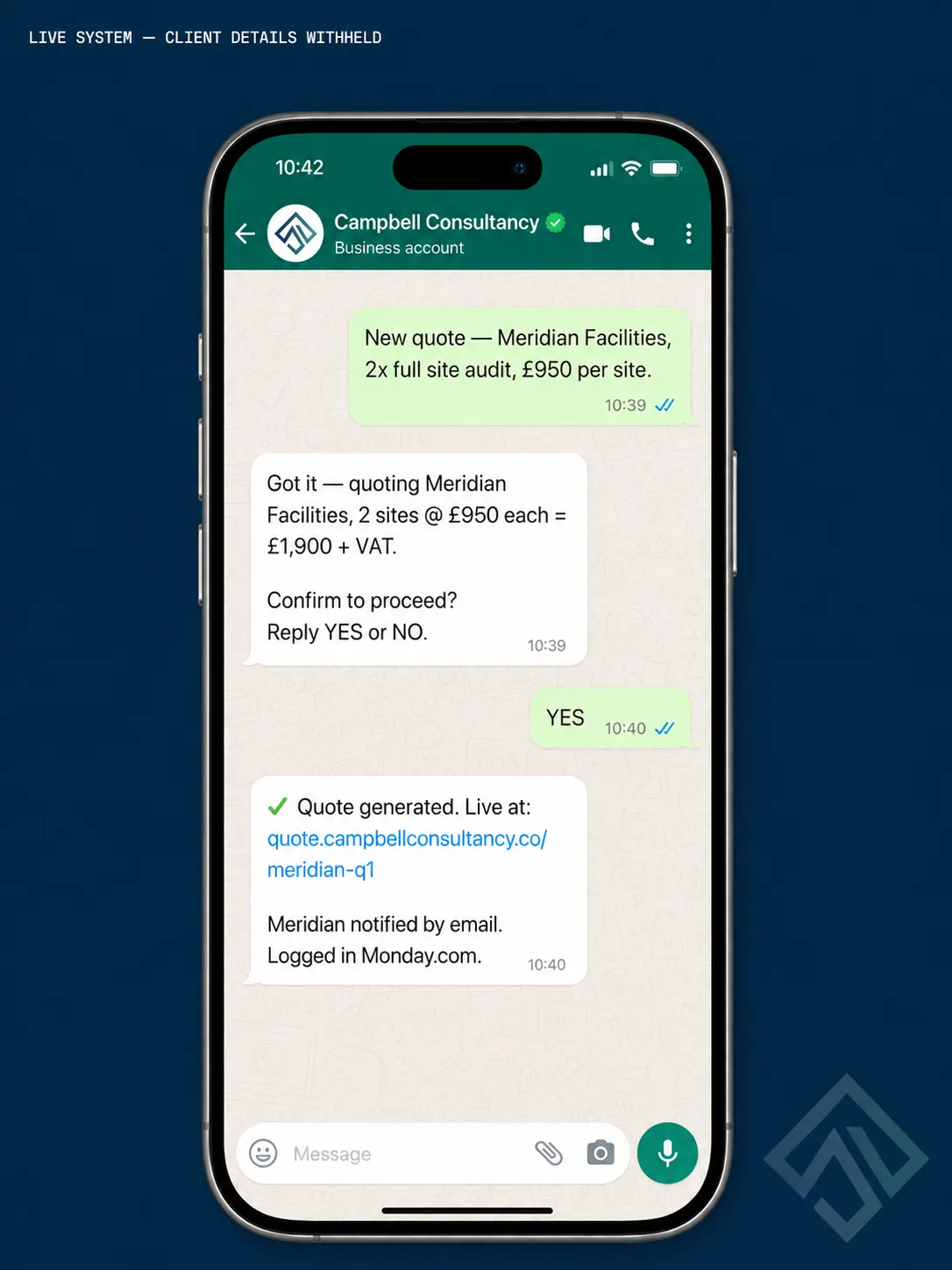
WhatsApp Business conversation showing automated proposal trigger — job details sent by sales person, bot confirms and returns live proposal URL

One WhatsApp message is all it takes. The system confirms the details, generates the proposal and returns a live URL — ready to send to the client.

Make.com — the automation canvas
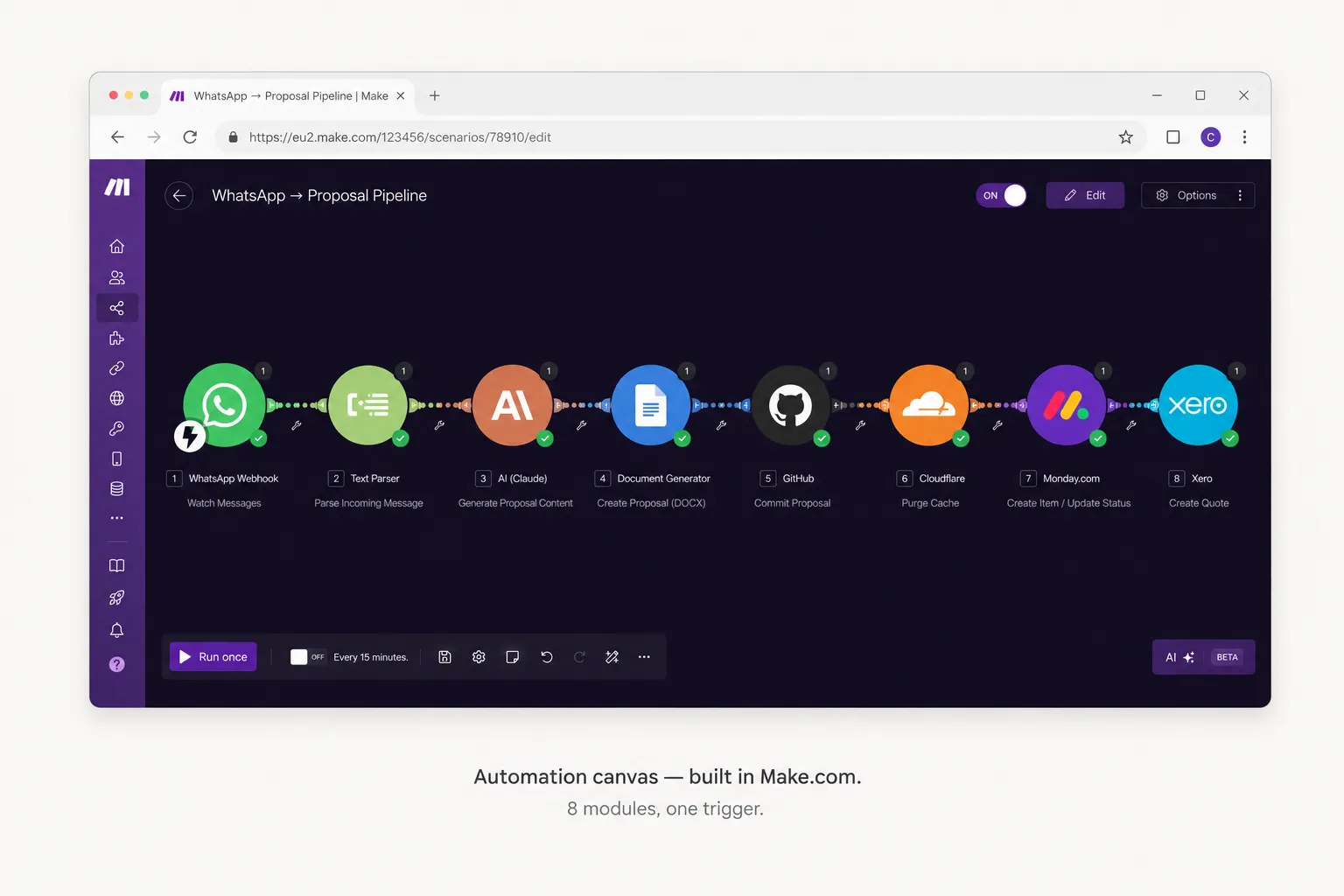
Make.com automation scenario canvas

One scenario. Eight outcomes. WhatsApp in — proposal, deployment, email, CRM and invoice all handled.

The live proposal — deployed to a permanent URL
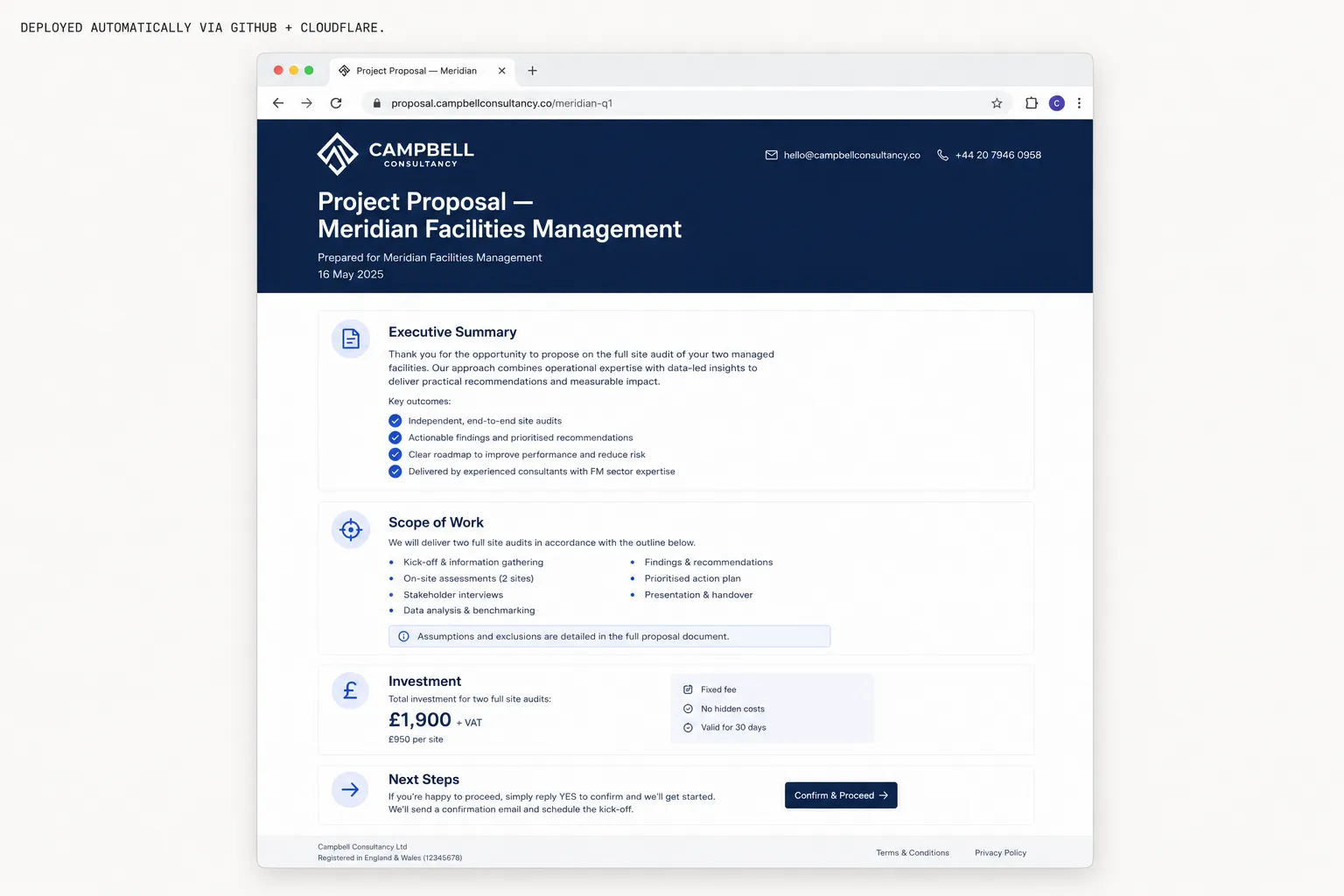
Live proposal page deployed automatically to Cloudflare Pages

Not a PDF attachment. A real, branded web page — live at a permanent URL the client can open, share and accept.

Monday.com — deal updated automatically
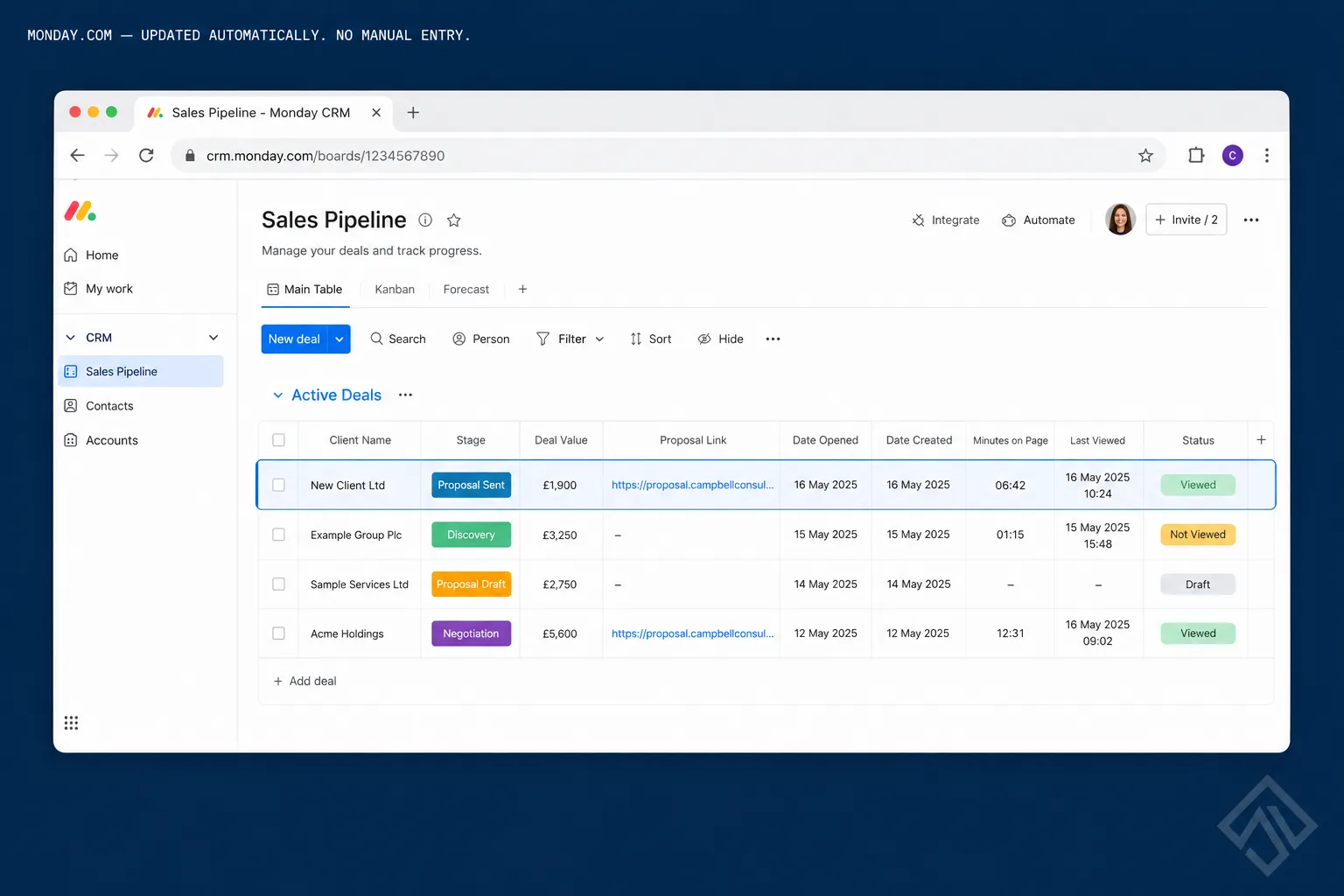
Monday.com CRM deal card auto-populated

Stage, value, proposal link — all populated without anyone touching Monday.com.

Xero — contact and invoice created automatically
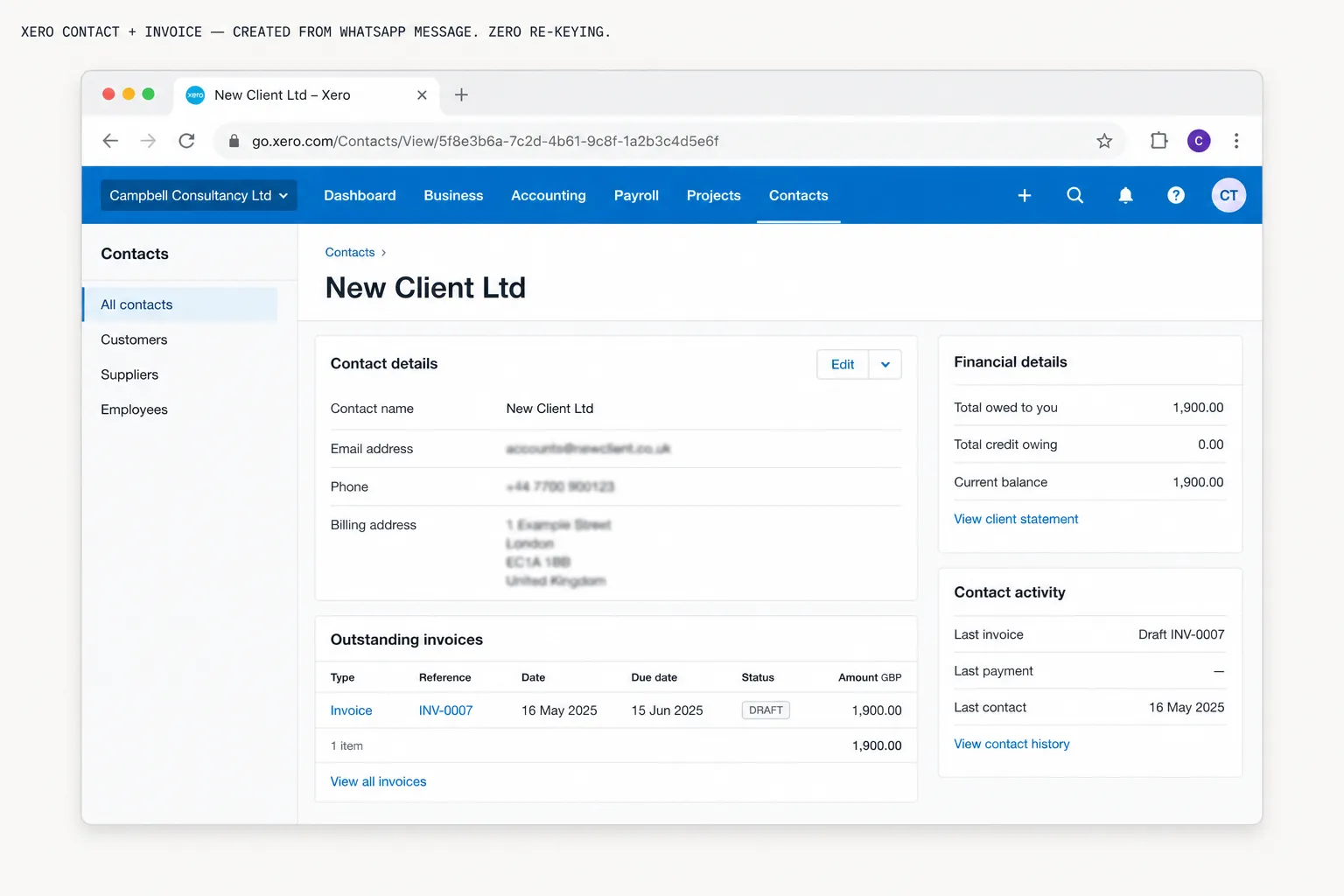
Xero contact record and invoice created automatically

New client contact and invoice created in Xero from the original message. Zero re-keying.

What you get

Concrete deliverables, not a demo.

Everything below is configured, tested and handed over running. Not a spec document.

01

WhatsApp Business API — configured and connected

Full WhatsApp Business API setup via an approved provider. GDPR-compliant message handling, opt-in flows and audit logging. Your number, your account, your data.

02

AI message parsing — trained on your services and terminology

The AI is trained on your specific services, pricing structure and terminology. It understands your language, not generic placeholders. Tone-of-voice guardrails built in — it never freelances on your brand.

03

Permissions layer — every sender knows their role

Staff see only their own data. Managers see their team. Directors see everything. Enforced by phone number — the same approach used across all our WhatsApp agent builds.

04

Make.com automation scenarios — built and documented

Each workflow is a separate Make.com scenario — clean, documented, maintainable. You own the scenarios. If you want to change something later, you can — or we can on retainer.

05

HR platform integration — BreatheHR, HiBob or Factorial

For HR and onboarding builds: full API connection to your HR platform. Leave requests, absence logging, new starter records, document filing — all written back automatically.

06

CRM and finance integration — Monday.com and Xero

For sales and invoicing builds: deals created in Monday.com, invoices raised in Xero, contacts created — all from the original WhatsApp message. No re-keying, no missed records.

07

Voice note transcription — for engineers in the field

Audio messages are transcribed and processed identically to text. Engineers on site with dirty hands can speak their updates. The system handles the rest.

08

30-day post-launch support included

A month of monitoring, refinement and fixes after go-live. If something behaves unexpectedly in production, we fix it — without a new invoice.

Common questions

What operators ask before they start.

Is this GDPR compliant?

Yes. WhatsApp Business API operates under Meta's data processing agreements and can be configured to meet UK GDPR requirements. All message data is handled within your own accounts — we don't hold client data. Opt-in flows and audit logging are included as standard.

What's the difference between the Meta Business Agent and a full API build?

The Meta Business Agent is a native tool inside Meta Business Suite — useful for handling inbound customer FAQs and basic queries on your customer-facing WhatsApp number. It's a good starting point and free to activate. A full API build is what you need for internal operational workflows — HR requests, invoicing, onboarding — where the system needs to connect to your HR platform, CRM or accounting software and actually write data back to them.

Do I need a WhatsApp Business account already?

No. We handle the full API setup through an approved WhatsApp Business Solution Provider. You'll end up with a properly configured business account connected to your existing number or a new dedicated one.

What if the AI misreads the message?

The system confirms the parsed details back to you via WhatsApp before anything is generated or sent. You approve before it proceeds. If something looks wrong, correct it in the chat and it reruns.

Which HR platforms does it connect to?

BreatheHR, HiBob and Factorial all have APIs that the automation layer connects to directly. If you use a different HR platform, we'll check API availability during scoping — most modern HR platforms support it.

How long does setup take?

Typically two to four weeks from kick-off to live, depending on scope. The Meta business verification process is the one variable — usually five to seven business days. Everything else runs in parallel.

What does it cost to run after the build?

Make.com Pro at around £16 per month covers the automation scenarios. The Meta Cloud API charges per conversation — at typical internal volumes this is a few pounds per month. The AI model costs pennies per message. Total: £20–40 per month depending on volume and use cases.

Tools we build on
WhatsApp Business API Meta Cloud API Make.com Monday.com Xero BreatheHR HiBob Factorial GitHub Cloudflare Pages Claude AI

Your team already uses WhatsApp. Time to make it work for the business.

Book a discovery call and we'll map the workflows your team runs manually on WhatsApp, identify the highest-value one to automate first, and tell you straight what it takes to build it.

Free ops checklist